# iDEAL

{% hint style="info" %}
iDEAL is supported through Stripe V2, Checkout.com, Adyen V2, Celeris, eMerchantPay, Mollie, Swipen, Trust Payments, Worldpay, Worldline, Cardstream, Celeris, and NomuPay gateways
{% endhint %}

***

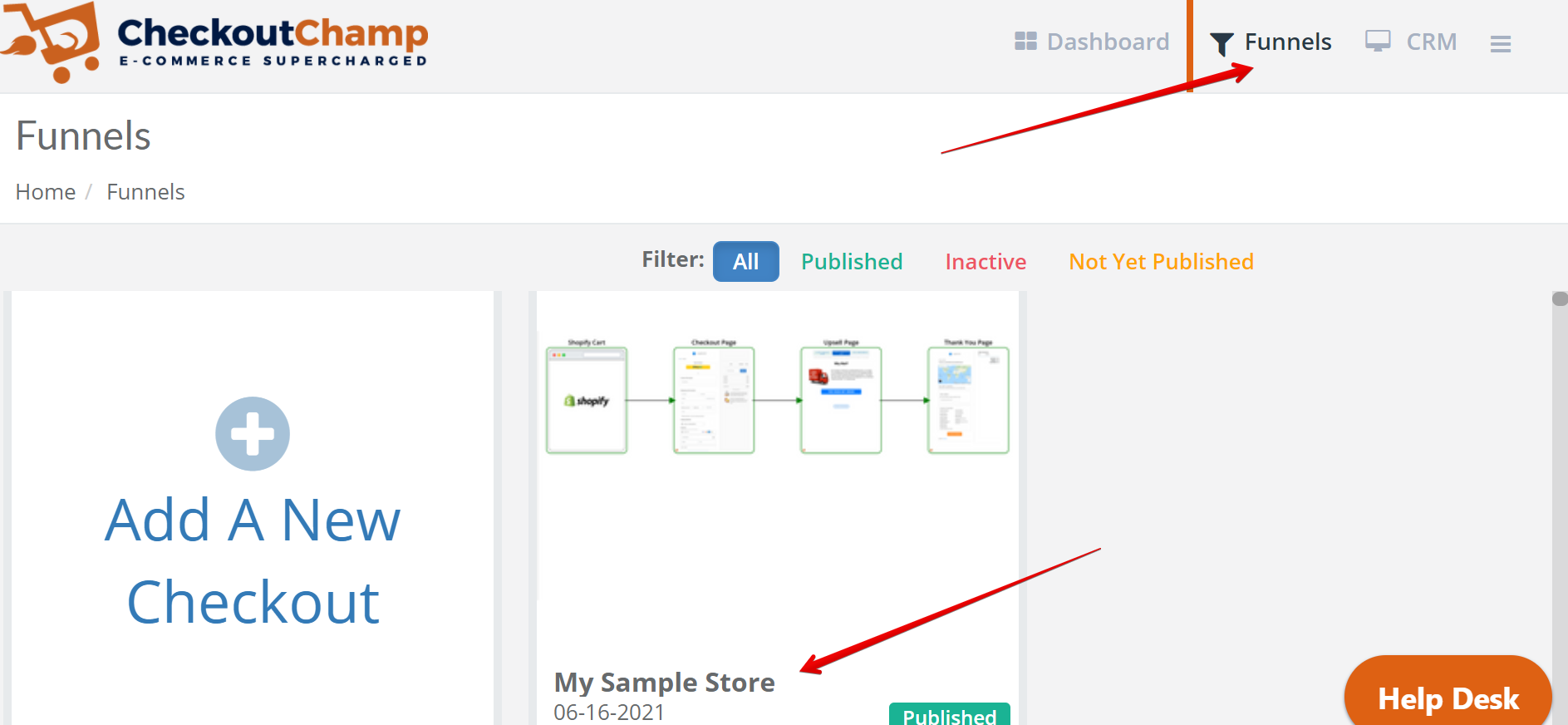
### Step 1: Login and navigate to the funnel to add iDEAL <a href="#ideal-checkoutchamp-step1-loginandnavigatetothefunneltoaddideal" id="ideal-checkoutchamp-step1-loginandnavigatetothefunneltoaddideal"></a>

<figure><img src="https://3790748257-files.gitbook.io/~/files/v0/b/gitbook-x-prod.appspot.com/o/spaces%2FT43PzcNjyZtWby9yrGd3%2Fuploads%2FHRMTOSqNBk0AgrwPdEQB%2Fimage.png?alt=media&#x26;token=92874949-b220-4b06-8ff8-c98f3b388005" alt=""><figcaption></figcaption></figure>

***

### Step 2: Click the gear button on the top left to open Settings <a href="#ideal-checkoutchamp-step2-clickthegearbuttononthetoplefttoopensettings" id="ideal-checkoutchamp-step2-clickthegearbuttononthetoplefttoopensettings"></a>

<figure><img src="https://3790748257-files.gitbook.io/~/files/v0/b/gitbook-x-prod.appspot.com/o/spaces%2FT43PzcNjyZtWby9yrGd3%2Fuploads%2Fi4Ji7XMDzRRleEhf1sOm%2Fimage.png?alt=media&#x26;token=9230b641-bd51-4351-8de2-07e2826c50c2" alt=""><figcaption></figcaption></figure>

***

### Step 3: Open the Payments section <a href="#ideal-checkoutchamp-step3-openthepaymentssection" id="ideal-checkoutchamp-step3-openthepaymentssection"></a>

<figure><img src="https://3790748257-files.gitbook.io/~/files/v0/b/gitbook-x-prod.appspot.com/o/spaces%2FT43PzcNjyZtWby9yrGd3%2Fuploads%2FQ8XfGFnzezHPTWjGME6M%2Fimage.png?alt=media&#x26;token=f2eacf4a-1711-4bf5-8517-1171f3c49d29" alt=""><figcaption></figcaption></figure>

***

### Step 4: Select a payment gateway on which to transact <a href="#ideal-checkoutchamp-step4-selectapaymentgatewayonwhichtotransact" id="ideal-checkoutchamp-step4-selectapaymentgatewayonwhichtotransact"></a>

* Stripe V2, Checkout.com, Adyen V2, eMerchantPay, Swipen, Trust Payments, Worldpay, Worldline, Cardstream, and NomuPay gateways can be selected here. Press the + button to add a new gateway.

<figure><img src="https://3790748257-files.gitbook.io/~/files/v0/b/gitbook-x-prod.appspot.com/o/spaces%2FT43PzcNjyZtWby9yrGd3%2Fuploads%2FHcyPOoaqYE7vzExX2NnC%2Fimage.png?alt=media&#x26;token=a330d494-ad3d-4b50-8798-3b350bdaccec" alt=""><figcaption></figcaption></figure>

***

### Step 5: Save and Continue <a href="#ideal-checkoutchamp-step5-saveandcontinue" id="ideal-checkoutchamp-step5-saveandcontinue"></a>

***

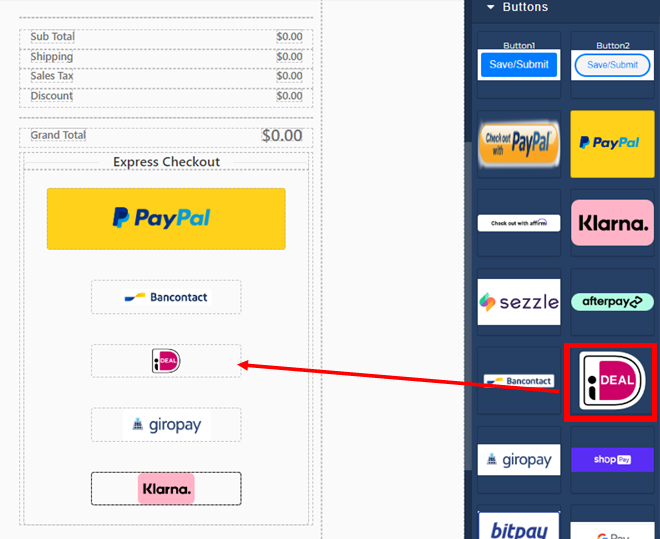
### Step 6: Edit Checkout page to add the iDEAL button <a href="#ideal-checkoutchamp-step6-editcheckoutpagetoaddtheidealbutton" id="ideal-checkoutchamp-step6-editcheckoutpagetoaddtheidealbutton"></a>

<figure><img src="https://3790748257-files.gitbook.io/~/files/v0/b/gitbook-x-prod.appspot.com/o/spaces%2FT43PzcNjyZtWby9yrGd3%2Fuploads%2F9o5YQivyelvLZjrLWNWj%2Fimage.png?alt=media&#x26;token=94ed1942-8d5e-482d-9c9a-a6f8c4d82759" alt=""><figcaption></figcaption></figure>

### Button <a href="#ideal-checkoutchamp-button" id="ideal-checkoutchamp-button"></a>

<figure><img src="https://3790748257-files.gitbook.io/~/files/v0/b/gitbook-x-prod.appspot.com/o/spaces%2FT43PzcNjyZtWby9yrGd3%2Fuploads%2Fm7B58bDHb77L6yjAj88g%2Fimage.png?alt=media&#x26;token=c471ad3d-5638-442f-ba94-fc02ed03f890" alt=""><figcaption></figcaption></figure>

#### Step 6-1(button): Customize button size by clicking on the button and dragging the highlighted corners or use the Dimension tab for advanced edits. Under the Settings for the element, be sure the Action is set to *Submit + Route* <a href="#ideal-checkoutchamp-step6-1-button-customizebuttonsizebyclickingonthebuttonanddraggingthehighlighted" id="ideal-checkoutchamp-step6-1-button-customizebuttonsizebyclickingonthebuttonanddraggingthehighlighted"></a>

### Radio <a href="#ideal-checkoutchamp-radio" id="ideal-checkoutchamp-radio"></a>

<figure><img src="https://3790748257-files.gitbook.io/~/files/v0/b/gitbook-x-prod.appspot.com/o/spaces%2FT43PzcNjyZtWby9yrGd3%2Fuploads%2FtnLYadrceoACBRq4r26A%2Fimage.png?alt=media&#x26;token=d7a28887-c60d-47e5-a05a-bb7caf611da3" alt=""><figcaption></figcaption></figure>

#### Step 6-1(radio): Add a radio button to the page. You may design this to your preference. <a href="#ideal-checkoutchamp-step6-1-radio-addaradiobuttontothepage.youmaydesignthistoyourpreference" id="ideal-checkoutchamp-step6-1-radio-addaradiobuttontothepage.youmaydesignthistoyourpreference"></a>

<figure><img src="https://3790748257-files.gitbook.io/~/files/v0/b/gitbook-x-prod.appspot.com/o/spaces%2FT43PzcNjyZtWby9yrGd3%2Fuploads%2FEEno2xmJokrCPNGM1GqD%2Fimage.png?alt=media&#x26;token=bf4bf59d-30cc-4711-b321-a2d99fe159ae" alt=""><figcaption></figcaption></figure>

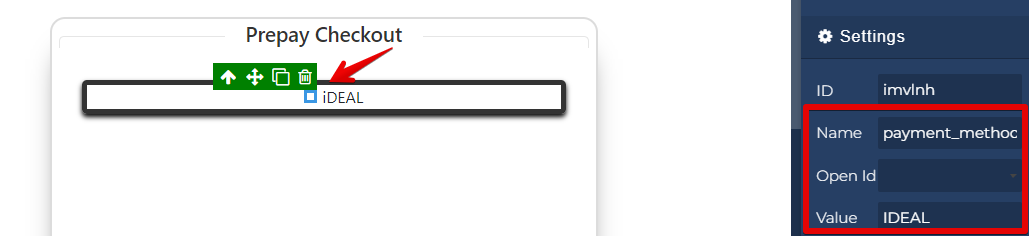
#### Step 6-2(radio): Select the radio button and change the settings so the Name is “payment\_method”. This may also be used with the payment toggler by setting the name to “fk-payment-option-toggler“. Then set the Value of the radio button to the name of the pay source in all caps. <a href="#ideal-checkoutchamp-step6-2-radio-selecttheradiobuttonandchangethesettingssothenameis-payment_method" id="ideal-checkoutchamp-step6-2-radio-selecttheradiobuttonandchangethesettingssothenameis-payment_method"></a>

{% hint style="warning" %}
Use either all buttons or radios for pay source selection.  Do not mix the method on the page.
{% endhint %}

***

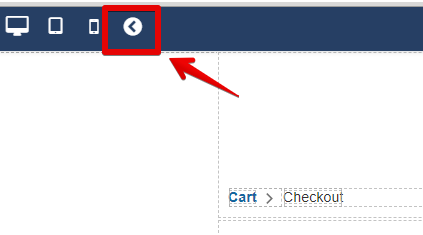
### Step 7: Save the page. Exit the page builder. <a href="#ideal-checkoutchamp-step7-savethepage.exitthepagebuilder" id="ideal-checkoutchamp-step7-savethepage.exitthepagebuilder"></a>

<figure><img src="https://3790748257-files.gitbook.io/~/files/v0/b/gitbook-x-prod.appspot.com/o/spaces%2FT43PzcNjyZtWby9yrGd3%2Fuploads%2FyAiV11GMsWdOWBobdACr%2Fimage.png?alt=media&#x26;token=b942d009-4044-4d38-8162-11f2845558a1" alt=""><figcaption></figcaption></figure>

***

### Step 8: On the arrow leaving the checkout page, choose the iDEAL button. <a href="#ideal-checkoutchamp-step8-onthearrowleavingthecheckoutpage-choosetheidealbutton" id="ideal-checkoutchamp-step8-onthearrowleavingthecheckoutpage-choosetheidealbutton"></a>

<figure><img src="https://3790748257-files.gitbook.io/~/files/v0/b/gitbook-x-prod.appspot.com/o/spaces%2FT43PzcNjyZtWby9yrGd3%2Fuploads%2FeCdHWSKrEMJpfCQo4Gu0%2Fimage.png?alt=media&#x26;token=8aa93141-cfbd-4429-a561-906d6d770788" alt=""><figcaption></figcaption></figure>

***

### Step 9: Publish. You’re done and ready to test! <a href="#ideal-checkoutchamp-step9-publish.youredoneandreadytotest" id="ideal-checkoutchamp-step9-publish.youredoneandreadytotest"></a>

{% hint style="warning" %}
Customer info fields are required for this alternate payment method.
{% endhint %}